
// browser-based · no install · private
Free PDF Redaction Tool: Accurate, Automated & Secure
Meet PDFized – the tool that automatically detects and permanently removes sensitive information from any PDF. Made irrecoverable, even programmatically, so your files are safe to share.
*Under optimal conditions. Accuracy varies by document. Terms & Conditions
$ AI-powered detection · irrecoverable removal
// built for every document type
One Redactor for Every Sensitive Document
Different documents hide different risks – account numbers in reports, names in contracts, diagnoses in records – but one engine detects and removes them.
- Financial reports
- Bank statements
- Business agreements
- Public records
- Legal contracts
- Intellectual property
- Medical records
- HR files
- Resumes & CVs
- Student records
- Insurance claims
- Personal information
// no manual redaction needed
Redact PDF Online – Automatically and Permanently
- drop PDF
- detect
- redact
- Download
One missed name or overlooked metadata field can expose data you thought was gone. Automated redaction removes sensitive information completely – so you're not relying on a manual review to catch everything.
Securely share contracts, financial data, medical records, and HR documents with third parties – ensuring no sensitive data is exposed.
PDFized is a free PDF redaction tool that handles it automatically – upload your file and get a clean, share-ready document in seconds.
No credit card needed to try it – redact your first document at no cost, right in your browser.
// before → after
See Redaction Happen in Real Time
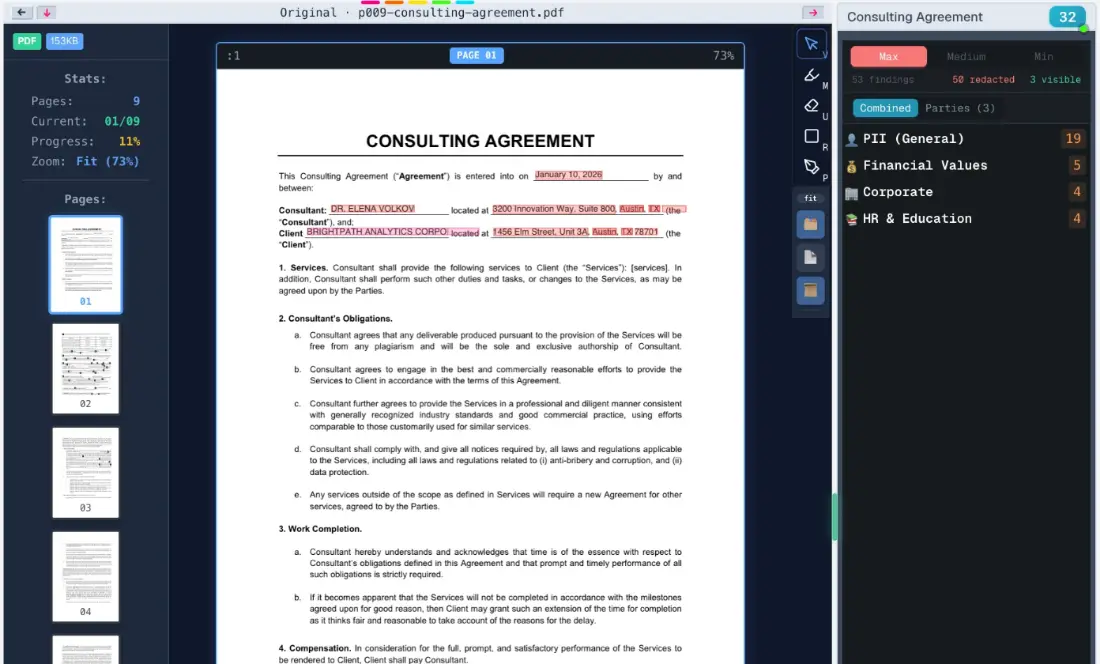
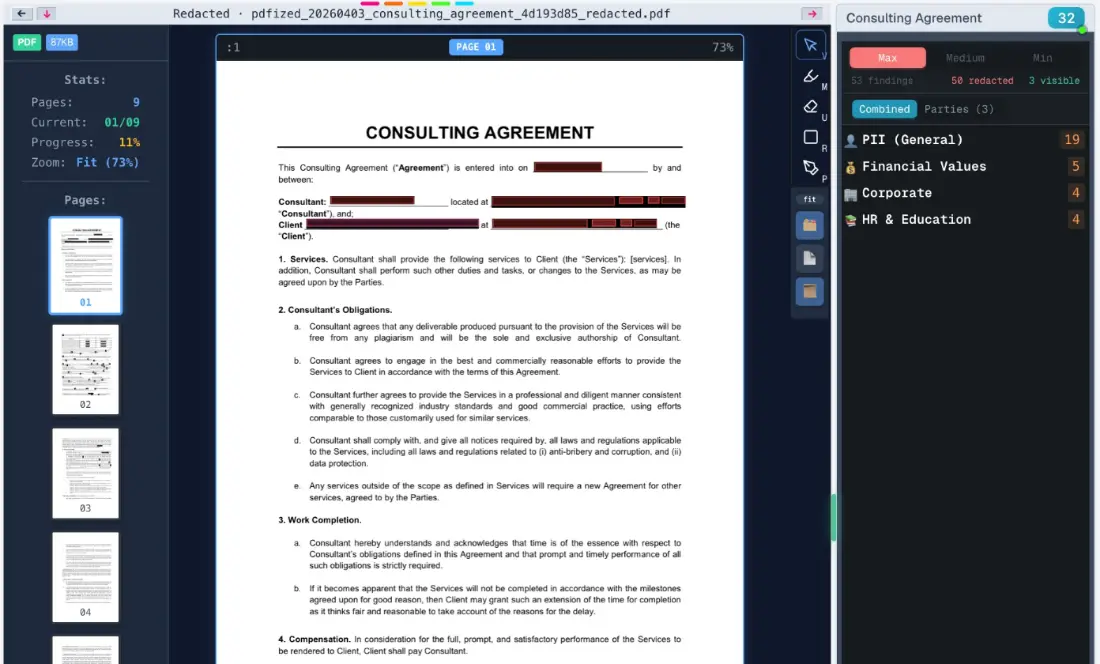
Sensitive names, addresses, dates, and amounts are detected and highlighted, then replaced with solid bars. The underlying text is purged from the file – not merely hidden.
Before redaction
53 detected// sensitive fields highlighted for review
After redaction
50 redacted// content purged – safe to share
// real dashboard screenshots · sample agreement with fictional data
// why automatic redaction
AI Finds What Manual Review Misses
Contracts, reports, and official documents are full of hidden identifiers – names, dates, numbers, prices, and legal details. PDFized classifies every finding by category and severity, then removes the sensitive ones, including hidden text and metadata.
- ✓ Detects PII, financial, corporate, and HR spans
- ✓ Permanent, irrecoverable removal
- ✓ AI document redaction strips hidden text and metadata too
- PII (General)19
- Financial Values5
- Corporate4
- HR & Education4
How Does PDFized Work?
Three steps to a safe-to-share PDF – the document flows from clean upload, through detection, to a permanently redacted file.
Upload your PDF
Drag and drop your file to upload it securely. Sensitive data is automatically identified and highlighted.
Sensitive data is removed
Our AI recognizes personal, legal, medical, and metadata content – then permanently and programmatically purges it.
Download your redacted PDF
Grab a sensitive-data-free version, or share it directly via secure link or email invitation.
DownloadKey Features of Our PDF Redaction Software
- removal
Complete removal of content
We created what we believe is the best PDF redaction software – PDFized removes not only text but also images, logos, and metadata, automatically. Our document redaction software handles any sensitive content quickly, securely, and with ease.
- ai-powered
Automated redaction
All you need to do is upload your document (or several), and AI will automatically recognize all sensitive parts, replacing them with permanent redaction bars. Your redacted PDF is ready to download instantly. It finds names, emails, phone numbers, addresses, account and routing numbers and SSNs.
- interface
User-friendly interface
Our PDF redactor offers two modes: standard and Surface – a spatial canvas for reviewing and adjusting redactions before finalizing.
- parties
Redaction by person
Sometimes only one person's details need to go. Choose a party and PDFized removes their name, address and account numbers across every page – everyone else's information stays exactly where it was.
- bulk
Bulk processing
Upload and redact multiple PDFs at once – built for high-volume workflows and large document sets.
- audit
Redaction log
Every redaction action is recorded – giving your team a complete audit trail of what was removed and when.
- portable
Compatible with any OS
No matter what device you have: our free PDF redaction tool works with any platform. Whether you operate with Mac, Windows, or Linux, the tool will fit your system.
- workspace
Document workspace
Manage, sort, and navigate all your redacted documents in one place – with grid and list views, keyboard shortcuts, and full canvas navigation.
Sanitize even your messiest PDF
Scanned pages, buried metadata, hundreds of names – cleaned in one pass.
Who Needs an Automated PDF Redaction Tool?
The short answer: anyone who shares documents containing other people's data. The trigger isn't your industry – it's the moment a document leaves your hands.
- 01LawyersClient names, numbers, sums, evidence
- 02GovernmentPersonal data per agency regulations
- 03CorporationsFinancials, IP, audit results
- 04HealthcarePatient information and records
- 05ResearchersConfidential data from collection
- 06JournalistsProtected sources in documents
// how we compare
PDFized vs Adobe, AI Chatbots & Other PDF Redaction Tools
The only dedicated redaction tool on this list – here’s what that means in practice.
| Feature | PDFized | Adobe | AI chatbots | PDF editors |
|---|---|---|---|---|
| Finds sensitive data automatically | yes | partial | partial | no |
| Redact by person or party | yes | no | no | no |
| Canvas workspace (Surface mode) | yes | no | no | no |
| Permanently removes data | yes | yes | no | no |
| Document stays private | yes | yes | no | partial |
| Scans and hidden metadata | yes | partial | no | no |
| Bulk processing | yes | partial | no | no |
| Audit trail | yes | no | no | no |
| Export and reuse redaction sets | yes | no | no | no |
| Browser-based, free to start | yes | no | yes | partial |
| Full PDF editing suite | no | yes | no | partial |
Here's the table in one line: a basic PDF editor hides the text, a chatbot makes you share it, and only a dedicated redaction tool finds it and actually deletes it – metadata included. Everything else just looks redacted.
// reliability
Secure, Permanent Redaction
*Under optimal conditions. Accuracy varies by document. Terms & Conditions
- Permanent removal. Content is purged, not masked – irrecoverable even programmatically.
- Encrypted throughout. Built with UK GDPR, EU GDPR, and US state privacy laws in mind.
// why choose pdfized
What Makes Our PDF Redactor Different?
- 01
Permanent redaction
Our free PDF redactor and automation tool ensures the content is completely removed, not just hidden. Test it yourself: after download, try selecting or copying a redacted area – there's nothing there to find.
- 02
Fast and efficient
The automated PDF anonymizer allows you to redact documents in seconds. Perfect for high-volume workloads. And speed doesn't cost precision – detection runs at 97.1% accuracy under optimal conditions.*
- 03
Customer support
Our responsive and proactive support team is ready to help you integrate our PDF redaction software into your workflow. Write to us directly – a real person answers, not a bot.
The Highest Level of Data Privacy
Whatever you're redacting, you can count on the following safety features:
- [01]Built for CCPA, UK GDPR and EU GDPR, with data processing agreements in place with every provider.
- [02]You control your data – delete documents anytime, with scheduled permanent removal.
- [03]Encryption in transit and at rest to protect your documents.
- [04]Your files and account data are hosted on secure, enterprise-grade infrastructure – Google Cloud and Supabase.
- [05]Redaction creates a new copy – your original file stays with you.
- [06]We never sell, rent, or trade your files or personal information.
If you have any doubts, visit our security page and learn more about our approach to safety.
FAQ
A PDF redaction tool is software that automatically removes sensitive data from PDF documents, making hidden content permanently irrecoverable – not just visually hidden. It ensures confidential information cannot be accessed or restored by anyone.
Redaction permanently deletes the data from the file. Hiding it (with a black box or highlight) just covers it up: the text is still there underneath, and anyone can select and copy it. Redaction removes; hiding only covers.
You can redact text, images, logos, metadata, and any other sensitive content within a PDF. Our PDF redactor detects and removes it automatically.
Yes. PDFized is built as a secure redaction tool: your documents are encrypted in transit and at rest, stored securely in your dashboard, and can be deleted at any time.
Yes. Your documents are stored securely in your personal dashboard until you delete them. You stay in control: delete anytime, and deleted files are scheduled for permanent removal. Behind the scenes, your data is kept on trusted cloud infrastructure from Google Cloud and Supabase.
Yes, our automated PDF redaction tool is a perfect fit for editing and securing all types of government records and legal documents.
Absolutely! Our document redaction tool supports batch processing. You can upload and redact multiple PDFs at once. We offer fast, automated solutions for handling sensitive documents at scale, including bulk document anonymization.
Yes. PDFized lets you redact documents for free for basic use cases, so you can securely remove sensitive information before sharing files. AI-powered bulk PDF redaction is included too, within the free plan's limits of 150 pages and 1 GB of storage. Everything runs in the browser: PDFized is a free redaction tool, so you can redact PDF online with nothing to install.
Yes. PDFized runs in your browser, so you don't need Acrobat Pro or any installed software. Upload the file, let the AI find the sensitive data, and download a permanently redacted copy.
// ready when you are
Redact your first PDF in seconds
Free, automated, and private. Upload a document and watch every sensitive field disappear for good.
Contact Us
Email us at
team@pdfized.com