
How to Redact Legal Documents
By PDFized TeamPublished on 8 min read
Legal documents often contain confidential information that should not be disclosed beyond authorized parties. This commonly applies to court filings, discovery requests, client contracts, and published legal records, among others. In each case, proper redaction is crucial. It keeps confidential data protected and helps meet privacy regulations.
We made this guide for you to explain what legal document redaction is, why it matters, common mistakes to avoid, and how to redact legal documents safely with the help of modern software.
Legal document redaction means permanently removing confidential information – not just covering it – before a filing, contract, or record is shared beyond authorized parties.
Legal Document Redaction: The Basics
Legal document redaction is the process of removing or obscuring sensitive information before a document is shared with others. The removal is permanent. It means that you do not simply cover text with a black box or change the font color to white. You are eliminating the underlying data so it cannot be recovered.
Redacted Legal Documents Example: Before and After
Here’s what proper redaction looks like on a real-world court filing – sensitive identifiers permanently removed, case details left intact:
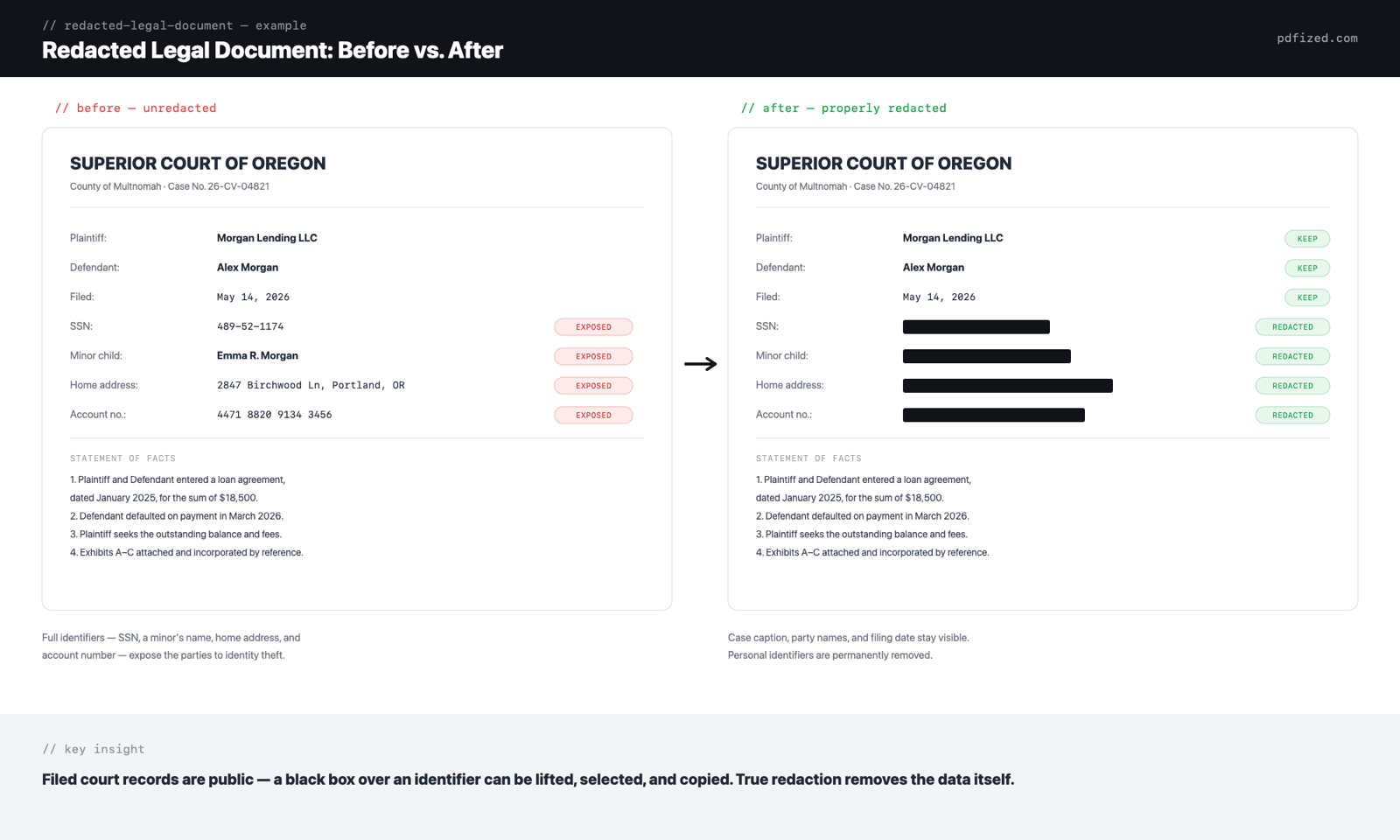
"Redacted" in legal practice: the short version
In law, redacted means that sensitive or confidential information has been permanently removed from a document before it's shared with others or filed with a court. Common examples include Social Security numbers, bank account details, home addresses, and other private information. In court, redacted documents are commonly used to protect private information while making legal filings or evidence available to the public or other parties.
When performed correctly, redaction permanently removes sensitive information from both the visible content and, where supported, the associated metadata. The general meaning of redacted is the same outside the courtroom – only the governing rules change.
Why Legal Document Redaction Matters
Legal professionals handle highly confidential information every day, regardless of their practice area. If this information is not properly redacted, it may fall into the wrong hands:
- Full names (when required)
- Dates of birth
- Government-issued ID numbers
- Passport details
- Driver's license numbers
- Social Security numbers
- Bank account information
- Credit card numbers
- Tax identification numbers
- Email addresses
- Phone numbers
- Residential addresses
- Signatures
- Medical information
- Trade secrets
- Confidential business information
- Confidential contract terms
- Witness identities
- Client-sensitive information
- Information protected by attorney-client privilege (see what a privilege log is)
- Minor children's personal details
Redacting a legal document?
PDFized finds and permanently removes confidential details for you – free.
A single redaction mistake may result in privacy violations. You may also face legal penalties, damage your client's trust, or destroy the confidentiality your practice is built on. Proper legal document redaction helps reduce these risks.
The financial impact of exposing sensitive information can be substantial. According to IBM's Cost of a Data Breach Report 2026, the global average cost of a data breach reached USD 4.99 million – a record high – highlighting the importance of secure document handling and redaction practices.
In US federal courts, redaction isn't just good practice – it's required. Under Federal Rule of Civil Procedure 5.2, any filing that contains a Social Security or taxpayer-identification number, a birth date, a minor's name, or a financial account number may include only the last four digits of the numbers, the year of birth, and the minor's initials. The responsibility for redacting rests entirely with the person filing the document, not the court. Criminal and bankruptcy cases have parallel rules (Criminal Rule 49.1 and Bankruptcy Rule 9037), and most state courts impose similar requirements. For the full picture of the federal rule, see what redacted means in court.
If you need to file or distribute documents, it is highly recommended to always review applicable court rules and privacy regulations. Organizations should also follow recognized standards for protecting personally identifiable information (PII). The National Institute of Standards and Technology (NIST) recommends implementing safeguards to prevent unauthorized disclosure of sensitive data throughout its lifecycle. Proper PDF redaction is one of the measures that helps reduce the risk of exposing confidential information before documents are shared externally.
Typical Legal Document Redaction Mistakes
Not every method of hiding text is secure. The following are some of the most common legal document redaction mistakes to avoid:
- Using black shapes. Adding a black rectangle over sensitive text only hides the information visually. Anyone can often remove the shape or inspect the document layers to reveal the original text.
- Changing text color. Making text white or matching it to the background doesn't remove it from the document.
- Cropping instead of redacting. Cropping only changes what is visible on the page. The hidden content may still exist within the PDF.
- Forgetting metadata. PDFs often contain metadata, comments, revision history, bookmarks, embedded attachments, or hidden text that can expose confidential information.
- Not reviewing the final document. Always verify that sensitive information has been permanently removed before sharing the file.
How to Redact Legal Documents Step-by-Step
Although the process involves several important steps, following the guidance below will help you redact legal documents securely.
1. Identify Sensitive Information
Before editing the document, carefully review every page and identify information that should not be disclosed. A helpful practice is to make a checklist so your redactions stay consistent across all documents.
2. Use a Redaction Tool You Can Trust
Avoid using drawing tools or image editors to hide text. These methods often leave the original content embedded within the PDF.
Instead, use dedicated legal redaction software designed to permanently remove sensitive information from PDF documents while preserving the original formatting.
3. Apply Permanent Redactions
After selecting all confidential information, apply the redaction rather than simply marking the content. A proper redaction tool permanently removes:
- Text
- Images
- Metadata associated with redacted elements (when supported)
This ensures the hidden information cannot be copied, searched, or recovered.
4. Check Headers, Footers, and Metadata
Sensitive information doesn't only appear in the document body. Review:
- Headers
- Footers
- Comments
- Annotations
- Hidden layers
- Embedded metadata
- Document properties
Removing metadata is an important step in preventing accidental disclosure.
5. Verify the Redacted PDF
Before sending the file:
- Search for redacted words.
- Try copying text from the redacted areas.
- Inspect document properties.
- Confirm all confidential information has been permanently removed.
A final review helps catch any overlooked information.
Best Practices to Stick to in the Process
Follow these best practices to reduce the risk of exposing confidential information during legal document redaction:
- Always work from a copy of the original file. You will thank yourself later if something goes wrong.
- Use software specifically designed for PDF redaction. Services like PDFized are designed to help make redaction both smooth and reliable.
- Review documents page by page. Even automated redaction deserves a human check before the file goes out.
- Remove metadata whenever possible. It is a crucial step to keep the most sensitive information away from others.
- Verify every redaction before sharing. For extra-sensitive documents, check twice – a second pass costs minutes, a missed redaction can cost much more.
- Maintain an unredacted master copy in a secure location. You may need the documents at some point.
Follow your organization's document handling policies for a correct redaction.
Common Legal Documents That Require Redaction
Many legal documents contain confidential, privileged, or personally identifiable information that should be redacted before they are filed, shared, or disclosed. Common examples include:
- Court filings and pleadings
- Contracts and agreements
- Discovery documents
- Affidavits and witness statements
- Deposition transcripts
- Legal correspondence
- Public records requests (FOIA)
- Police reports and law enforcement records
- Search warrants and supporting affidavits
- Evidence submitted to the court
Any organization that handles confidential information should make secure document redaction part of its document management process.
Who Usually Redacts Legal Documents?
There's no single answer – it depends on the type of case, the jurisdiction, and the organization's internal procedures. In most situations, the party submitting or sharing the document is responsible for making sure confidential information has been properly removed. Redaction is typically handled by:
- Attorneys and paralegals preparing court filings or discovery documents
- Corporate legal departments reviewing contracts and confidential business records
- Courts handling publicly accessible case files
- Government agencies responding to public records requests
- Law enforcement agencies preparing police reports or investigative records for disclosure
- Prosecutors and public defenders managing evidence and case documents
- Compliance and risk management professionals handling sensitive legal and regulatory records
Regardless of who performs the redaction, every document should undergo a final quality check before it is shared. A thorough review helps identify missed personal information, hidden metadata, or incomplete redactions that could lead to accidental disclosure. Establishing a consistent review process is one of the most effective ways to reduce the risk of exposing confidential information.
Redacting Scanned Legal Documents
Not all legal documents contain selectable text. For instance, court records, signed agreements, notarized documents, and archived files are often scanned PDFs that, in turn, are made of images rather than editable text. Before these documents can be securely redacted, the software typically needs to perform Optical Character Recognition (OCR). OCR detects and converts the text within scanned pages into searchable content, allowing the redaction tool to accurately identify and permanently remove sensitive information.
When working with scanned legal documents:
- Make certain that OCR has correctly recognized the text before you do all the redactions.
- Review handwritten notes, stamps, and signatures manually – OCR often misses them.
- Zoom in during the verification process to see that no confidential information has been skipped.
- After applying redactions, save a new copy and confirm that the concealed information cannot be searched, copied, or recovered.
Using OCR-enabled redaction software makes it much easier to securely process scanned legal files while preserving the readability and formatting of the original document.
Key Takeaways
Legal document redaction requires permanently removing confidential information before a file is shared. Use tried-and-tested redaction software, review documents carefully, and verify the final output before sharing. These simple steps help protect confidential information and maintain compliance with privacy requirements.
// faq
FAQ
Yes – if the redaction was done the wrong way. A black box or white text only hides the information visually. The text is still inside the file, and anyone can recover it by copying the text or removing the shape. Proper redaction deletes the data itself, so there is nothing left to find.
No. A black box drawn over text leaves the original content in the PDF. Courts warn against this method, and it has already exposed confidential information in real filings. Only a redaction tool that removes the text itself gives you reliable protection.
As a rule: personally identifiable information – Social Security and taxpayer ID numbers, dates of birth, home addresses, and financial account numbers – plus privileged communications, minors' names, and witness identities, depending on the document and jurisdiction. Headers, footers, and metadata need the same review as the document body.
Federal and state rules set exact limits – identifiers reduced to partial forms (last digits, initials, year only) before filing. The rule-by-rule breakdown with examples is in our guide to what gets redacted in court.