
PDFized vs. ChatGPT: Can a Chatbot Redact a PDF?
By PDFized TeamPublished on 8 min read
Chances are you’ve already tried it. You have a contract, a bank statement, or a medical record with details that need to disappear, and you know that chatbot seems to be capable of doing literally anything. So you upload the file and type, asking the machine to redact the personal information from this PDF, waiting for magic to happen.
But the worst has already happened. You have just shared probably the most sensitive information about you. While people protect information like that, you just let it go, not knowing where. Everything else in this comparison is secondary to that one fact.
What Actually Happens When You Ask ChatGPT to Redact a PDF
We recommend you check the details below before you do something you can’t undo:
- You upload the unredacted file. The complete document (every SSN, account number, and name) is transmitted to the chatbot's servers. On consumer plans, conversations and files can be used to improve the models unless you've opted out. Whatever the settings, the data has left your hands. For documents covered by HIPAA, GLBA, or attorney-client privilege, that upload alone can be the compliance incident.
- The model reads the text it can see. It's often good at spotting names, numbers, and addresses in the text layer. It's also inconsistent: ask twice, and you can get two different lists. There's no guarantee it caught the SSN repeated in a page footer or inside a table.
- It produces something that looks redacted. Depending on how you ask, you get a rewritten text version of your document (the original formatting is gone), a script that draws black rectangles (the classic cover-up – the text usually survives underneath), or a rebuilt PDF where you have no way to verify what the generation process kept, dropped, or changed.
- Nothing touches the metadata. Document properties, author names, revision history, embedded objects (the hidden layer where redaction failures live) are outside the conversation entirely.
The result can look perfect and still fail the only test that matters: select the blacked-out area, copy, paste. If text comes out, nothing was redacted.
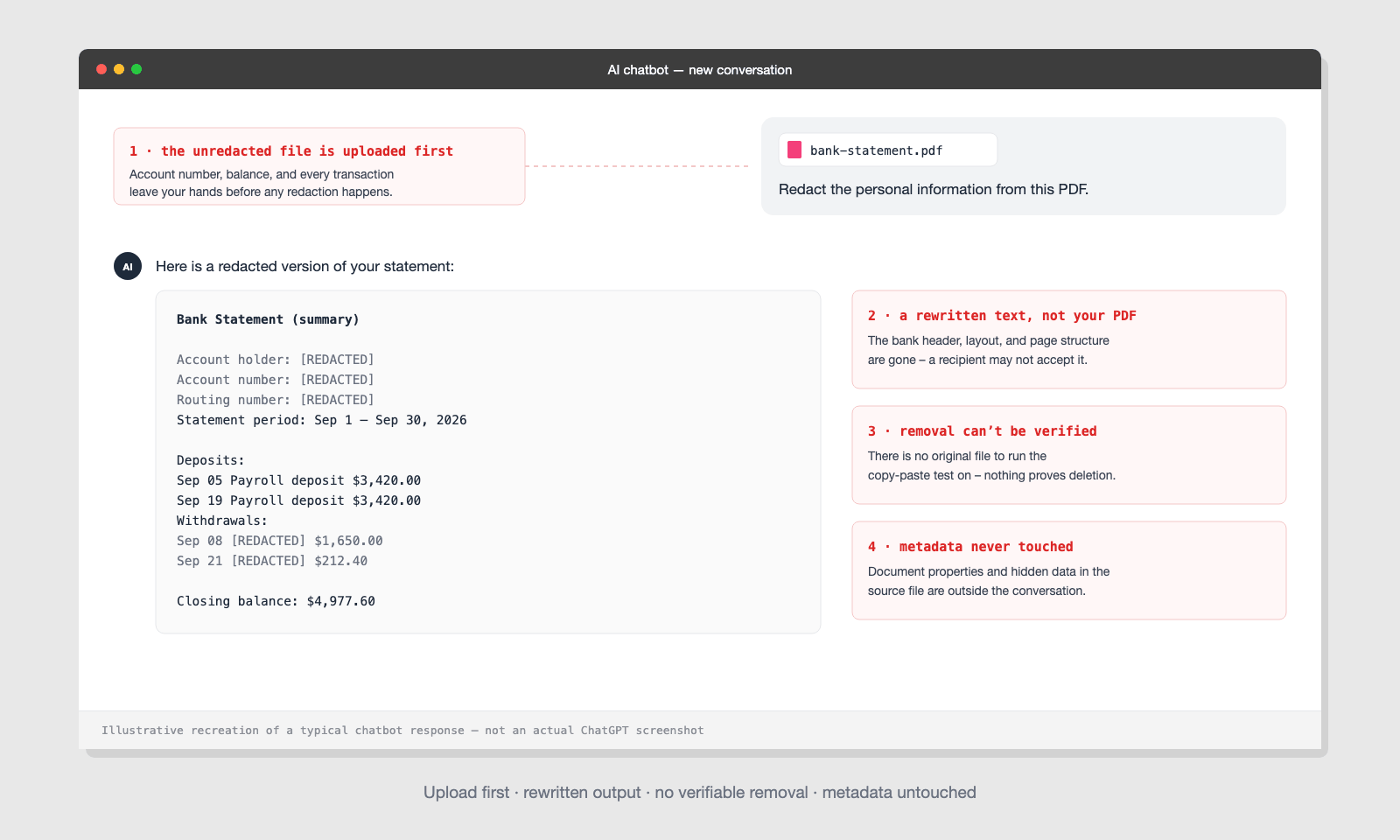
The paradox underneath all of this is the following: redaction exists so that sensitive data reaches fewer systems and fewer people actually see it, and routing the unredacted document through a general-purpose chatbot does the opposite. Even when the output happens to be good, the exposure already happened at upload. We discuss the broader question of trusting Artificial Intelligence with sensitive files here: Is AI redaction safe?
Doesn't a Business Plan or the API Fix This?
Some people might say: ChatGPT's business plans (Enterprise and Team) promise to protect your data better, and anything sent through the API isn't used to train the AI unless you allow it. So isn't the privacy problem already fixed?
It improves the contractual side. But the problem is that the architectural problems don't move:
- Still no verified removal. The output is still a rebuilt file or a cover-up; no plan tier changes what the model produces.
- Still blind to metadata. Document properties and hidden layers remain untouched on every tier.
- Still no audit trail. There's no record of what was found, what was removed, and what was reviewed – the artifact a compliance process needs.
The same logic works when running a local model. In other words, you solve the upload problem, but you inherit everything else, inconsistent detection, unverifiable output, and no redaction mechanics. Privacy terms fix who sees the data. They don't make a chatbot into a redaction engine.
PDFized vs. ChatGPT: Feature by Feature
| Capability | PDFized | ChatGPT |
|---|---|---|
| Finds sensitive data automatically | Yes – purpose-trained detection for PII, financial, medical, and legal identifiers | Partially – can spot much of it, inconsistently, with no completeness guarantee |
| Permanently removes data from the file | Yes – text and image data deleted, not covered | No – outputs are rewrites, cover-ups, or rebuilt files you can't verify |
| Document stays private | Yes – a single-purpose redaction pipeline | No – the unredacted file is uploaded to a conversational service |
| Scanned documents | Yes – OCR built into the redaction flow | Limited – reading scans is possible; redacting them reliably is not |
| Hidden metadata | Removed in the same pass | Untouched |
| Batch processing | Yes – entire folders in one session | No – file by file, conversation by conversation |
| Audit trail | Every redaction logged | None |
| Output fidelity | Your original PDF, minus the sensitive data | A rebuilt or rewritten file – formatting and content fidelity not guaranteed |
| Price | Free to start | Free tier – but the gap isn't about price |
Where ChatGPT Genuinely Helps
Credit where it's due – a chatbot is a useful companion around the redaction process:
- Understanding the rules. "What does Rule 5.2 require me to redact?" is a great chatbot question.
- Building checklists. It can draft a solid list of what to look for in a lease, a medical record, or a court filing.
- Writing policy. Internal redaction guidelines, training materials, request-handling templates.
Notice the pattern: every good use case involves no sensitive document changing hands.
Where PDFized Is the Better Choice
PDFized is a dedicated PDF redaction tool. It actually does what the chatbot only approximates:
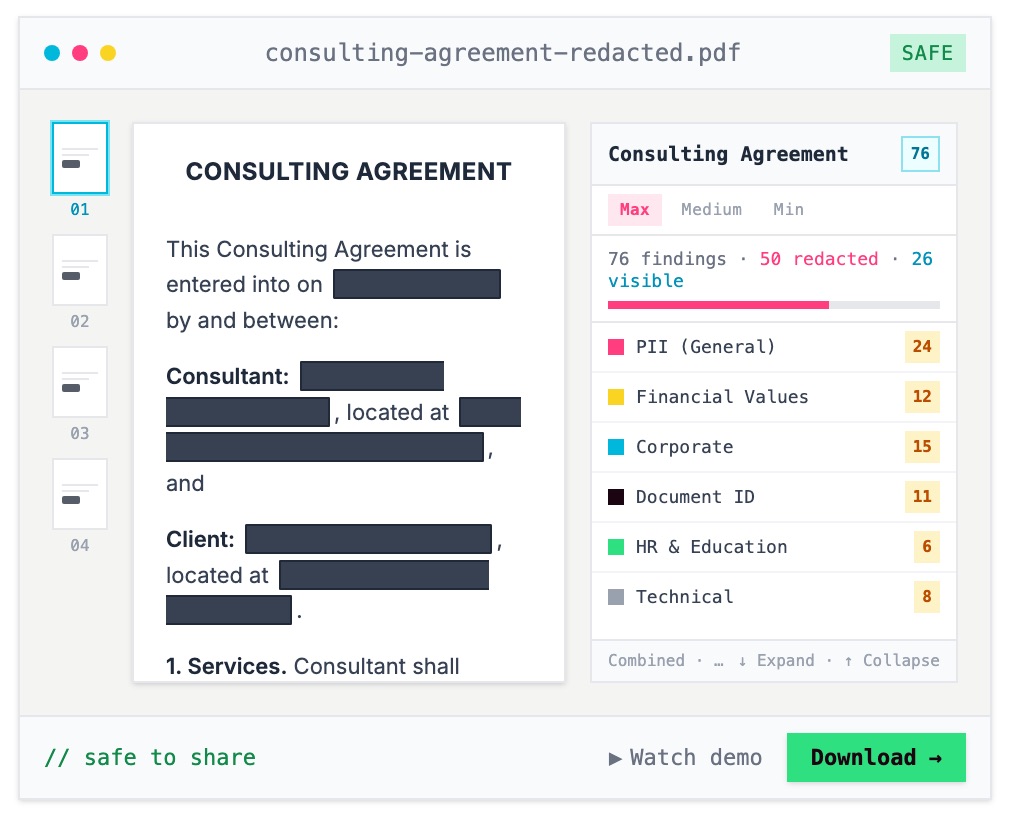
- Detection you can review. Artificial Intelligence helps you find names, SSNs, account numbers, dates, and signatures across every page. Then, it shows you each finding for confirmation before anything is applied.
- Removal that is actually removal. Applied redactions delete the underlying text and image data. The copy-paste test comes back empty, every time.
- The failure points covered. OCR for scans, metadata scrubbing in the same pass, repeated identifiers caught across headers, footers, and exhibits.
- Scale. A 200-page chart or a folder of statements processed in one session. In other words, there are no context limits and no re-prompting.
- Proof. Every redaction is logged, which is what a court, auditor, or compliance reviewer asks for.
Skip the chatbot for this one
Upload your PDF to PDFized and get your own file back with the sensitive data permanently removed – free.
The same distinction applies to professional desktop software. Speaking of that, we have compared that side too in PDFized vs. Adobe Acrobat. If you're ready to take a look at the deeper question of automation versus human review, we recommend you reading AI-powered vs. manual redaction.
A Real-World Example: The Bank Statement Test
Say a landlord asks for a bank statement as proof of income, and you want your account number and transaction details hidden first.
The ChatGPT route: you upload the full statement – account number, balance, every transaction – to the chatbot. You ask it to redact. It returns a rewritten summary that no longer looks like a bank statement, or a file with black boxes you can't verify. The landlord may reject the rebuilt file because it no longer looks authentic – and your full statement now lives in a chat history.
The PDFized route: you upload the statement to a tool built for exactly this. The account and routing numbers, card numbers, and transaction memos are detected and highlighted; you confirm what goes and what stays (income deposits stay – the landlord needs them). Apply once. You get back your own statement – same layout, same bank header, verifiably clean. The copy-paste test returns nothing.
Same request, same file, two completely different risk profiles.
How to Verify Any AI-Redacted Document
It doesn’t matter what tool you used to produce the file. Whatever the case, you have to run this 60-second test before sending it anywhere:
- Select and copy. Drag across every blacked-out area and paste into a text editor. If anything appears, the redaction failed.
- Search the file. Ctrl+F for the exact terms you redacted – a name, the first SSN digits. Zero results, or it failed.
- Check the properties. Open the document properties and look for names, titles, and revision data that shouldn't be there.
- Convert it. Export the PDF to Word or plain text and scan the output – conversion resurrects text that was only visually covered.
If you did a proper redaction, your file is supposed to pass all four points above. Yes, every time. A chatbot's output usually can't be verified this way at all – because what you got back isn't your original document.
The Bottom Line
If you would like to make ChatGPT part of your redaction story, here’s the number one recommendation: use it just to learn what to redact. When you need to redact, use a special redaction tool designed for that exclusively. The chatbot's weakness isn't intelligence. It's architecture. In other words, Artificial Intelligence needs your unredacted document to even begin. Plus, it can't guarantee permanent removal, and it never sees the metadata. A purpose-built tool starts from the opposite premise: the document is sensitive, so detection, removal, and verification happen in one controlled pass – and what comes out is your own PDF with the sensitive data gone for good. If you want the full manual-method comparison as well, our guide on how to redact a PDF covers every approach.
// faq
FAQ
Yes, but ChatGPT does not do it reliably. It can detect much of the sensitive text, but the output is a rewritten or rebuilt file. It is not your original PDF with the data verifiably deleted. And you must upload the unredacted document just to try.
No, if we are talking about docs with PII, PHI, financial data, or privileged material. The upload itself shares the data with a third-party service, and for regulated documents, that alone can be a reportable disclosure.
No. Stuff like doc properties, author names, and revision history stay untouched. And it’s metadata that is one of the most common ways "redacted" documents leak.
The best way to redact a PDF using Artificial Intelligence is by using it inside a dedicated redaction tool, not a general chatbot. In general, the process looks like this: automated detection, human review, permanent removal from your original file, and metadata scrubbed. That's the workflow PDFized runs, free, in your browser.