
PDFized vs. Adobe Acrobat Redaction
By PDFized TeamPublished on 8 min read
Redaction isn't editing. Hide a name behind a black box, and if the text underneath survives, anyone can copy it right back out – that's how Social Security numbers and witness names end up exposed in files that looked perfectly clean. (Here's what happens when redaction fails.)
For years, Adobe Acrobat Pro has been the default answer. It works – but it's a giant suite where redaction is one manual tool among hundreds. PDFized is the opposite: purpose-built, AI-powered, and it runs in your browser. Here's the honest comparison – where Acrobat holds up, and where PDFized wins.
Quick verdict
- Choose PDFized if you want AI that detects sensitive data by category, permanent removal with metadata stripped in the same pass, bulk processing, and a free, browser-based tool anyone can use in seconds.
- Choose Adobe Acrobat if you already pay for Acrobat Pro, work fully offline on the desktop, and redaction is an occasional step inside a bigger Acrobat workflow.
PDFized vs. Adobe Acrobat at a Glance
| Feature | PDFized | Adobe Acrobat Pro |
|---|---|---|
| Finds sensitive data for you | ✅ AI detects categories automatically (names, SSNs, emails, addresses, account numbers, and more) | ⚠️ Search & pattern-based – you tell it what to find, then review marks |
| Permanent removal (not just a black box) | ✅ | ✅ (when applied correctly) |
| Removes hidden metadata | ✅ In the same pass | ⚠️ Optional "Sanitize" toggle at apply time – easy to skip |
| Scanned PDFs / images (OCR) | ✅ Built-in, part of the redaction flow | ⚠️ Requires running OCR first; text search doesn't work on raw scans |
| Batch / bulk redaction | ✅ Many files, AI-detected, one session | ⚠️ Multi-file text search exists; no bulk AI review, applying is per file |
| Works in the browser (no install) | ✅ | ❌ Redaction requires the desktop app |
| Price for redaction | ✅ Free to start | 💲 Acrobat Pro only – from $19.99/mo (annual commitment) |
| Audit trail | ✅ Every redaction logged | ⚠️ Limited |
| Purpose-built for redaction | ✅ | ❌ One feature in a large suite |
Legend: ✅ full support · ⚠️ partial/manual · ❌ not available
What is PDFized?
PDFized is a free, browser-based PDF redaction tool that uses AI to automatically detect and permanently remove sensitive information from documents – with nothing to install.
Key features:
- Automatic AI detection of personal data: names, Social Security numbers, emails, phone numbers, addresses, dates, account and loan numbers, signatures, logos, and more.
- Permanent redaction – the underlying text and data are deleted, not covered, so nothing can be copied or recovered.
- Hidden metadata removal in the same pass (author, edit history, embedded data).
- OCR for scanned PDFs and images, so redaction works on photographed or scanned pages too.
- Batch processing – redact multiple documents at once.
- Standard and Surface modes for text-based and spatial/scanned documents.
- Audit trail – every redaction action is recorded.
- Industry-ready for legal, healthcare (HIPAA), government (FOIA), finance, insurance, DSAR (GDPR/CCPA), education (FERPA), HR/CVs, and real estate.
- Any device with a browser – desktop, tablet, or phone.
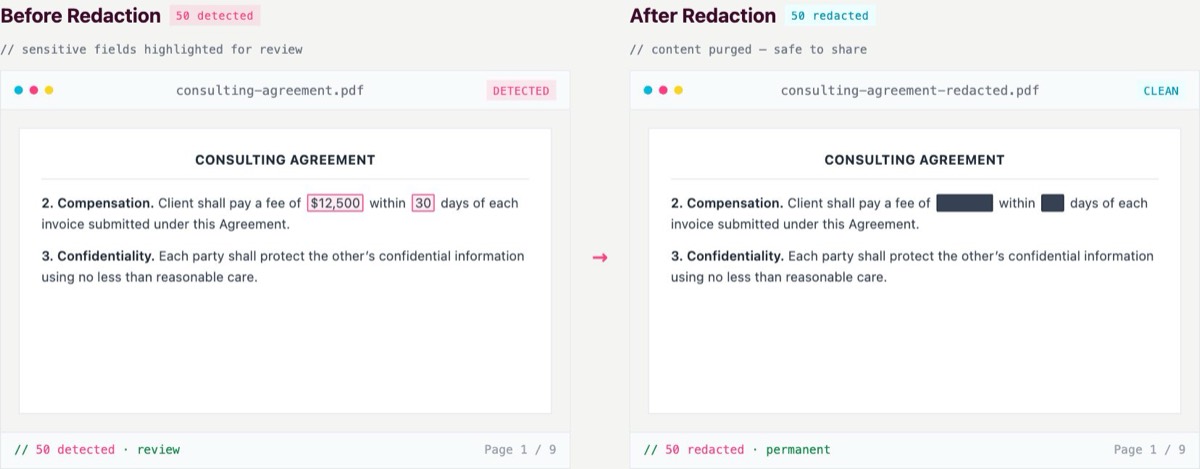
Still marking redactions by hand?
Upload a file and let PDFized's AI find and permanently remove the sensitive data for you – free.
What is Adobe Acrobat's Redaction Tool?
Adobe Acrobat Pro is a full-featured PDF suite, and the Adobe redaction tool is one feature inside it – reliable when applied correctly, but built for manual, page-by-page work on the desktop.
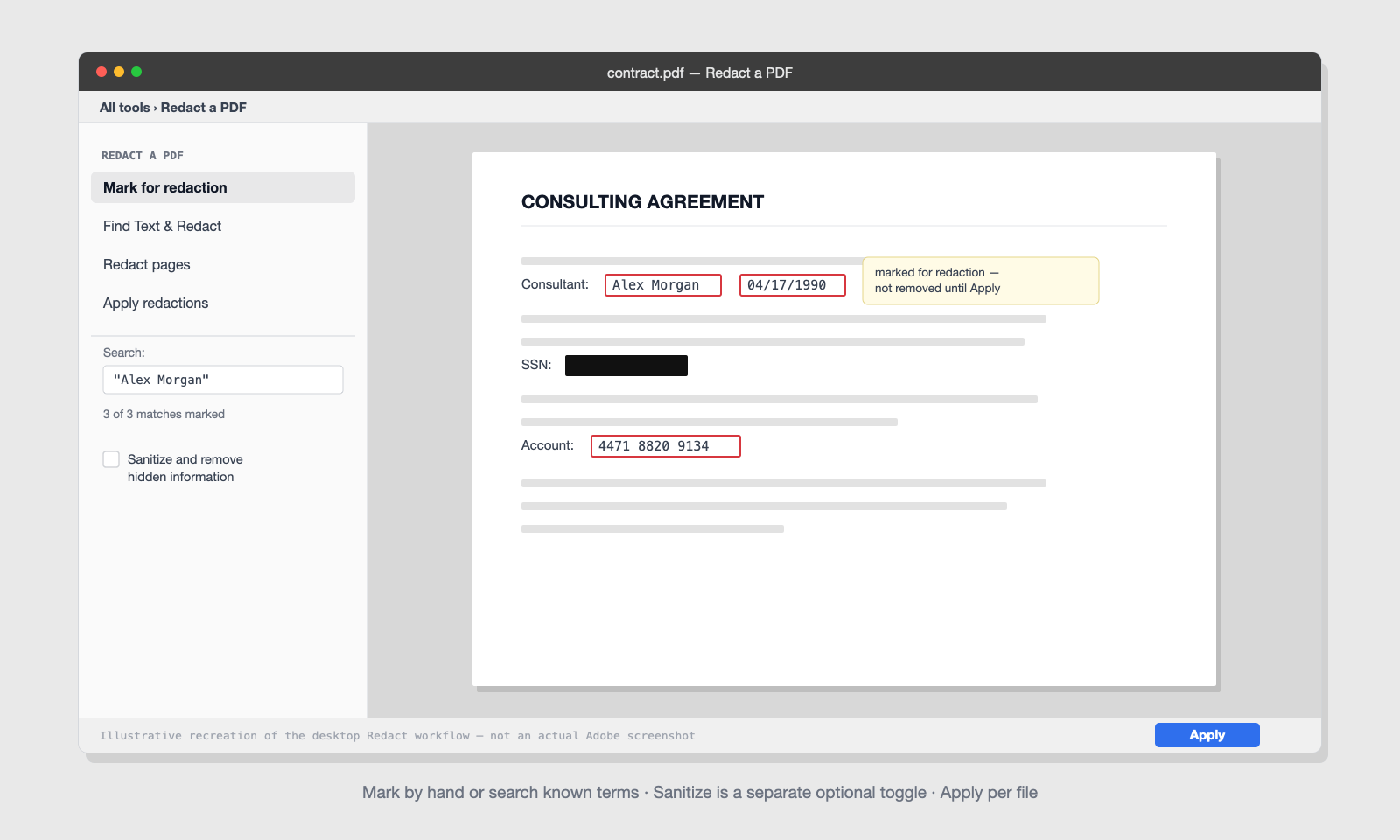
Everything’s at your service, from editing and forms to e-signatures and much, much more. And the best part is that the suite has a cool Redact tool. You mark text and images yourself, or use Find Text & Redact to search for specific words or common patterns. The latter usually includes phone #, Social Security numbers, and credit card numbers. Then you mark every match. Then you apply, and after that, a dialog offers an optional Sanitize toggle in case you’d like to remove hidden info.
It's capable and trusted, but three things stand out: redaction requires a paid Acrobat Pro subscription (it's not in the free Reader, and not in Acrobat Standard), it's desktop-only – the tool isn't available in the mobile app or browser version – and its search finds only what you think to search for. Anything you don't anticipate – a nickname, a handwritten note, an account number in an unusual format – stays in the file.
PDFized vs. Adobe, Head to Head
1. AI detection vs. search-and-mark
It’s the key difference, and we would like to talk about it more precisely. When you work with Acrobat, it can easily find strings you tell it to find. They include ‘ingredients’ like exact words, phrases, or preset patterns like SSNs. It is the best solution for users who already know what can be found in the doc. PDFized detects categories it recognizes on its own. In other words, the instrument simply scans the file and surfaces names, addresses, account numbers, signatures, and other sensitive data you didn't think to search for. On a long or unfamiliar document, that's the difference between reviewing a highlighted list and hoping your search terms covered everything. One missed item is a leak.
Winner: PDFized. Detection you didn't have to script is the whole point of automated redaction.
2. Permanent removal – including hidden metadata
If you use both instruments correctly, you can remove all info you want to hide from others. But the difference is the data that users cannot see. PDFized strips hidden metadata. It includes elements like author names, revision history, and embedded fields. When you work with Acrobat, sanitizing is an optional toggle in the apply dialog. Of course, it's there, but nothing makes you use it. So it is no wonder that many people skip it. And skipping it inevitably leads to “redacted” files still leaking information later. (Here's how to remove metadata from a PDF and why it matters.)
Winner: PDFized. Metadata removal shouldn't depend on remembering a checkbox.
3. Scanned documents and OCR
A huge share of sensitive documents are scans or photos – IDs, signed contracts, medical forms. Acrobat's text search can't read a raw scan; you have to run OCR as its own step first, and a box drawn on an image without proper application protects nothing. PDFized runs built-in OCR inside the redaction flow, so scanned pages are read and redacted in the same pass. If most of your files come off a scanner, this alone decides the comparison – see our guide to redacting scanned PDFs.
Winner: PDFized. Scans are where cover-up redaction fails hardest – and where built-in OCR pays off most.
4. Bulk redaction at scale
Acrobat can run a text search across a folder of PDFs, which helps when you're removing the same known phrase from many files. But there's no bulk AI review – each document is still applied and saved individually, and pattern search inherits the "only what you searched for" limits. PDFized supports true batch processing: upload many documents, let the AI detect sensitive data across all of them, review, and redact together. For case files, claims batches, or FOIA queues, that's where the hours come back.
Winner: PDFized. Folder-wide text search is a convenience; batch AI redaction is a workflow.
5. Price and access
Redaction lives only in Acrobat Pro: $19.99/month on an annual commitment (about $240/year), or $29.99/month if you want to cancel anytime – per person. Acrobat Standard, the cheaper tier, doesn't include the Redact tool at all, and neither does the free Reader. It's also a desktop install, which matters for mixed-device teams.
PDFized is free to start, with no account or credit card required for your first document, and runs entirely in the browser on any OS. If redaction is the job – not the whole Acrobat suite – you're not paying $240 a year per seat for one tool.
Winner: PDFized. Free and in the browser beats $240/year and an install – when redaction is the job.
6. Audit trail and compliance
For regulated work, "we redacted it" isn't enough – you need to show what was removed and when. PDFized keeps an audit trail of every redaction and is built around the permanent-removal standard that GDPR, CCPA, HIPAA, and FOIA expect. Acrobat's redaction logging is more limited.
Winner: PDFized. Compliance is about proof, and proof needs a log.
"But It's in the Browser…Is It Actually Safe?"
It’s not a surprise that many Acrobat users have this kind of question. The point is that uploading confidential files to a web tool doesn’t sound like a safe thing to do. Plus, it looks even riskier than processing ‘em locally. But let us take a look at what PDFized does in such a case. First of all, its docs are encrypted at every step. The whole processing thing happens in a secured, encrypted environment. Besides, files stay in your dashboard only until you delete them. The users always remain in control of the whole lifecycle of the doc. What is more, the tool is built with UK GDPR, EU GDPR, and US privacy laws in mind.
The flip side of the desktop argument is worth naming too: local processing protects you only as well as the laptop it runs on. A browser tool with encryption and a deliberate deletion step is a different trade-off, not automatically a worse one.
How Redaction Works in Each Tool
In Acrobat, you find and mark everything yourself, then apply. In PDFized, you upload the file and the AI finds it for you. Here's each workflow step by step.
How to redact a PDF in PDFized:
- Open PDFized in your browser and upload the PDF – no install, no account for the first document
- Let the AI scan and highlight detected sensitive data; review and adjust the findings
- Apply – text, images, and hidden metadata are permanently removed in one pass, and the redaction is logged
- Download the clean file
How to redact in Adobe Acrobat:
- Open the PDF in the desktop app and select All tools → Redact a PDF
- Mark content by dragging over it, or use Find Text & Redact for words and patterns (run OCR first if the document is a scan)
- Select Apply, and remember to enable the Sanitize toggle to remove hidden information
- Save the redacted copy under a new name
Both flows end in permanent removal – the difference is how much of the finding, checking, and metadata handling you carry yourself. (New to the topic? Start with our full guide on how to redact a PDF.)
Where Adobe Acrobat Still Makes Sense
We'll say it plainly: if your organization already pays for Acrobat Pro, lives in it daily, and policy forbids uploading files anywhere, the Redact tool is a workable choice for occasional, single-file redaction inside a larger Acrobat workflow. That's the honest extent of it.
Everything past that point – detection you didn't script yourself, scanned documents, batches, metadata by default, a tool the whole team can open in a browser for free – is PDFized's home ground.
The Benefits of PDFized Over Adobe Acrobat
- You stop hunting and start reviewing. The AI surfaces names, numbers, and signatures across the whole document, so a task that means line-by-line reading in Acrobat becomes checking a highlighted list. Minutes instead of hours – and no "did I search for every variation?" doubt.
- Nothing leaks after you ship the file. Text, images, and hidden metadata are permanently removed in one pass, with no sanitize toggle to forget. The most common causes of post-redaction leaks – a missed item and skipped metadata – are engineered out of the workflow.
- Scans stop being a special case. OCR runs inside the redaction flow, so IDs, signed contracts, and photographed forms get the same treatment as digital text – no separate recognition step first.
- Whole folders, one session. Batch processing turns a case-file queue or a claims backlog into a single upload-review-apply cycle, instead of opening, marking, applying, and saving files one at a time.
- Every seat is covered at zero cost. Anyone on your team can redact from any browser today – no $240/year Pro license per person, no install ticket for IT, no waiting for the one colleague who has Acrobat.
- You can prove what you did. The audit trail records every redaction, which is exactly what GDPR, HIPAA, and FOIA reviews ask for – "we redacted it" becomes "here's the log."
Adobe treats redaction as one tool inside a huge product. PDFized treats it as the whole point – and that focus is exactly why it's faster, safer, and easier for the documents most people actually need to protect.
See the difference on your own document: try PDFized free – no account, no credit card, no install. Upload a file and watch the AI find what you'd have spent an hour marking in Acrobat.
// faq
FAQ
Yes – you can start redacting for free in your browser, with no install and no credit card for your first document.
Redaction requires Acrobat Pro: $19.99/month on an annual commitment (about $240/year) or $29.99/month month-to-month. It isn't included in the free Reader or in Acrobat Standard.
Yes. PDFized deletes the underlying text and data – and hidden metadata – so redacted content can't be copied or recovered. It isn't just a black box on top.
Partially. Find Text & Redact locates exact words and preset patterns like Social Security or credit card numbers – but only what you tell it to search for. PDFized's AI detects sensitive data by category without you specifying it in advance.
Yes. Built-in OCR reads scanned pages and images inside the redaction flow. In Acrobat, you need to run OCR as a separate step before text search works on a scan.
Both can produce compliant redactions. PDFized's automatic detection, same-pass metadata stripping, and audit trail reduce the human-error risk regulators care about – the missed item and the forgotten sanitize step.
In Acrobat Pro, open All tools → Redact a PDF, then mark content by hand or use Find Text & Redact. The tool isn't available in the free Reader, Acrobat Standard, the mobile app, or the browser version – redaction is desktop Pro only.