What Is OCR? How It Works, and Why Accurate Redaction Depends on It
By PDFized Team·Published on ·Updated on ·8 min read
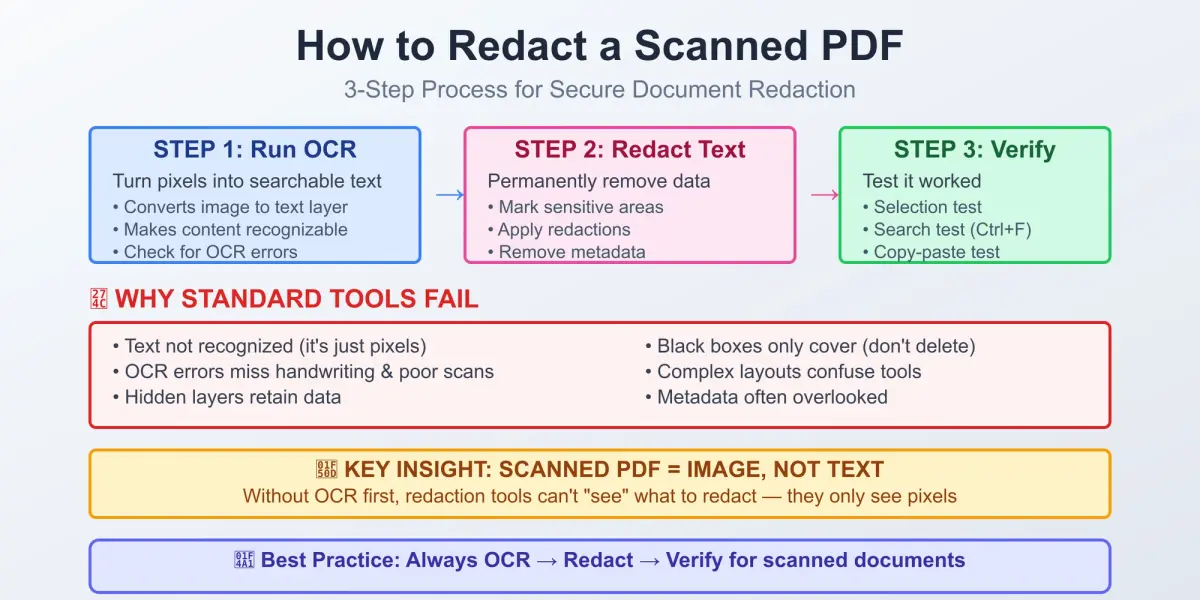
Optical Character Recognition is the technology that turns images of text – scanned pages, photographed documents, PDFs – into text your device can read, search, and edit. For anyone working in redaction, records management, or document compliance, OCR is the invisible first step that makes everything else possible: you can't reliably find and redact sensitive information in a document unless a machine can first "read" that document.
Read on to boost your knowledge of what OCR is, why it matters, and what is hidden behind those three letters, as well as what the data says about its progress today.
What OCR Means
OCR is a computer vision technique that identifies text within a digital image. It doesn’t matter where your image comes from. It can be literally anything, from a flatbed scanner, a smartphone camera, to a screenshot. Then, the tech converts the shapes of characters into machine-encoded text (typically Unicode or ASCII). The output is no longer a picture of the word "Confidential"; it's the actual string "Confidential," which a computer can copy, search, index, or feed into another program. Applied to a PDF, OCR means adding that machine-readable text layer to a scanned or image-only file – which is what makes the document searchable and redactable. A closely related but distinct capability is ICR (Intelligent Character Recognition), which specializes in handwritten text rather than printed fonts. A third sibling, OMR (Optical Mark Recognition), reads checkboxes and form marks rather than characters. Most modern "OCR" products bundle all of these, along with layout analysis that understands tables, columns, and form fields rather than treating a page as one flat block of text.
The Benefits of Making OCR Part of the Process
- Searchability and retrieval. When the process is over, every word becomes searchable. For example, let's say you have a scanned 200-page contract. OCR helps you turn it into something you can Ctrl+F. No need to flip through page to page.
- Redaction accuracy. OCR makes redaction much faster. You don’t read every page and do not have to cover up sensitive info manually. You have OCR for help. It helps the software find all those names, addresses, account numbers, phone numbers, and other private details in scanned docs. Then they get automatically redacted.
- Less work when you do data entry. You are not supposed to retype all those details from paper forms, invoices, or IDs. OCR does the job: it extracts the info directly, so you don’t have to do a lot of work and can avoid making mistakes.
- Compliance and audit trails. Digitized, searchable records are far easier to produce during audits, e-discovery, or regulatory review than boxes of paper or unindexed scans.
- Accessibility. Screen readers can read this text, or it can be translated automatically. Plus, it can be resized. It’s simply impossible with a flat image of a page.
- Storage and cost efficiency. Searchable digital text takes a fraction of the space and handling cost of physical archives, and it doesn't degrade the way paper does.
Today, OCR is a driving force in many niches. It is now part of how businesses handle documents. And the numbers back it up: more and more companies are adopting OCR. According to ResearchAndMarkets, the global OCR market was worth about $22.21 billion in 2026 and is expected to grow to $60.04 billion by 2032, with an annual growth rate of 17.7%. As for the leader, it is definitely North America. This part of the globe makes up more than 35% of global revenue. Most growth tends to come from businesses that use AI-powered OCR to do all those financial audits, legal document reviews, and automate paperwork in industries such as healthcare and government.
Redacting scanned or image PDFs?
PDFized uses OCR to find and permanently remove the sensitive text – free.
How Does OCR Work?
OCR is a multi-stage pipeline, not a single algorithm. A typical workflow looks like this:
- Acquisition and preprocessing of the image. First, it gets cleaned up. There are things like de-skewing of crooked pages, removing noise and speckling, adjusting contrast, and binarizing the image that should be done at this point. You need to have a text that stands out clearly from the background.
- Layout analysis / segmentation. The system identifies the structure of the page (separating body text from headers, tables, images, and columns) and then segments that text into lines, words, and individual characters.
- Character recognition. This is the core step. Classic OCR engines compared character shapes against a stored library of font patterns. Modern engines use neural networks (typically convolutional neural networks paired with recurrent networks or transformers) trained on millions of text samples to recognize character and word shapes probabilistically, even in fonts or handwriting they haven't seen before.
- Post-processing. The raw output is checked against dictionaries, language models, and contextual rules to catch and correct likely errors – for example, recognizing that "rn" was probably misread for "m."
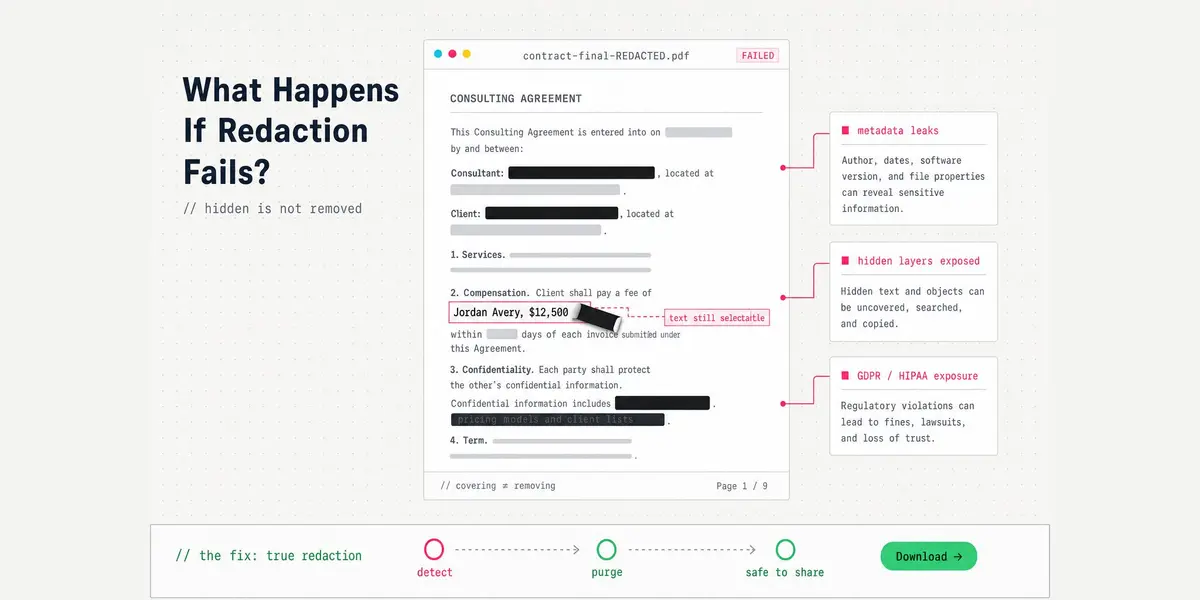
- Output generation. You get a searchable text. The text is typically layered invisibly beneath the original scanned image (a "searchable PDF") – the same hidden text layer that causes redaction failures when tools only cover the image on top.
OCR Redaction Accuracy: What the Research Shows
Accuracy is highly dependent on the type of source material:
- Clean, printed text. OCR engines now routinely exceed 99% character-level accuracy on high-quality scans of standard typed fonts, and current benchmarks put character error rates below 1% for clean printed text.
- Older or degraded documents. Word-level accuracy on real-world scans (faded ink, low resolution, unusual fonts) has historically ranged between 80% and 95% for Latin-script languages. It is quite adequate for many uses. However, it is not adequate for applications that need 100% perfect fidelity.
- Handwriting. This remains the hardest problem in the field. Handwriting recognition benchmarks currently run 3–5% character error rate at best, and cursive or highly irregular handwriting remains difficult even for top-performing systems. Separate industry testing found that everyday handwriting typically lands between 80% and 95% accuracy, while messy or cursive notes can fall to 60–80% – low enough that a human reviewer is usually still needed.
- Historical context. Even more than 10 years ago, researchers agreed that if OCR gets less than 90% of the text right, the quality is generally considered poor. For that reason, fields like legal, healthcare, banking, and insurance don't rely on OCR alone when working with sensitive docs – it helps them work faster, but they still have to check all the results to avoid mistakes.
For redaction work specifically, this accuracy gap matters: a redaction tool is only as good as the OCR layer feeding it. Sensitive text that OCR fails to recognize (because of poor scan quality, unusual fonts, or handwriting) can't be reliably located and redacted by automated tools, which is why manual review remains a necessary safeguard even in highly automated pipelines.
That's why PDFized runs OCR on scanned files before detection, so the text exists for the AI to find – our guide on how to redact a scanned PDF walks through the full process.
Where OCR Is Headed
Industry analysts point to a few consistent trends:
- AI-driven engines are replacing template-matching OCR. The integration of artificial intelligence with OCR has helped companies leverage deep learning and multi-level analysis to process documents in a way more similar to how humans read, improving handling of low-contrast, non-flat, or otherwise imperfect source material.
- Cloud-based OCR is growing the fastest. The quality of phone cameras gets better while cloud infrastructure gets cheaper. We see that everywhere, and it all helps expand OCR use beyond just enterprise scans. It becomes what we call everyday mobile capture.
- Document-heavy sectors lead adoption. The software segment led the OCR market with more than 81% of revenue, and the BFSI (banking, financial services, and insurance) sector was the leading vertical, accounting for over 19% of revenue – both signals of where the heaviest document-processing and compliance burdens sit.
Conclusion
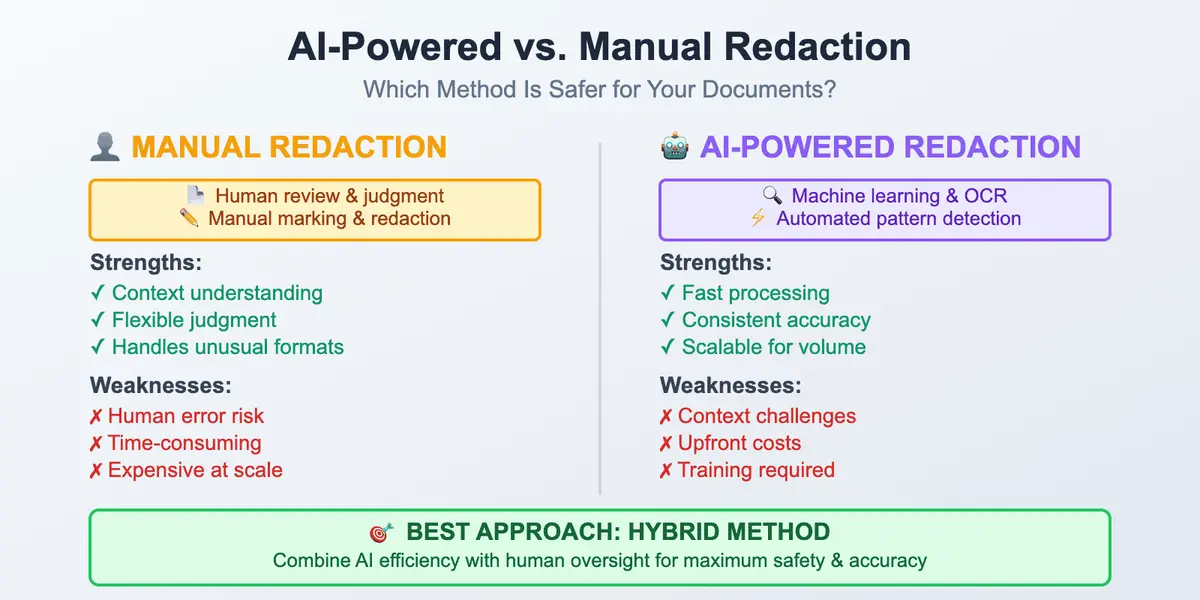
Today, OCR is more than just another instrument in the arsenal of tools used to turn paper into a digital file. It has become an integral part of how businesses organize docs, stick to privacy requirements, and the way they keep sensitive details under protection. To perform redaction properly, you have to know what OCR is about, as well as what it can and can't do. As for clear, printed text, there will be no problem. But blurred handwriting or some poor-quality scans fail everything. With that in mind, our comparison of automated vs manual redaction will help you decide when the software is enough and when you should check the doc yourself. Thus, you’re 100% sure nothing important was missed.
// faq
FAQ
Not always. If a PDF was created in a digital way (for example, exported from Word), the text is often already embedded and searchable, so no OCR is needed. OCR is required when the PDF is really just an image. It can be something like a scanned page, a photo, or a flattened document (no underlying text layer!).
The level of accuracy usually depends greatly on source quality. Clean, printed text on a good scan can exceed 99% accuracy. Faded, skewed, low-resolution, or otherwise degraded scans typically drop to somewhere in the 80–95% range at the word level, which is why quality control matters for anything sensitive or legally significant.
Yes, but with far less reliability than printed text. Neat handwriting in structured form fields can reach 90%+ accuracy, while cursive or messy handwriting often falls to 60–80%.
Redaction tools can only find and black out sensitive information if the underlying text is machine-readable. If OCR misreads or misses text, that content can slip past automated redaction entirely. For that reason, manual review is crucial together with tools that are OCR-based.
Most modern OCR tools can read common image files like JPEG, PNG, and TIFF, as well as scanned or image-based PDFs. Next step – to create a searchable PDF, where the original page looks the same but the text can be searched and copied. Plus, OCR can also export the text as a plain text file or save the extracted information in formats like JSON or CSV.
Try to select the text with your cursor, or search it with Ctrl+F. If nothing selects and search finds nothing, the page is just an image – it needs OCR. If the text selects and copies normally, a text layer already exists and you can skip OCR.