
Redacted Contract or Agreement: Meaning, Example, How-To
By PDFized TeamPublished on 8 min read
A redacted contract is a copy of an agreement, where some specific 'ingredients' get permanently removed. They usually are prices, bank details, or personal data, so the rest can be shared safely. The signed original stays untouched. Only the copy you hand over changes.
You won't believe it if you find out how much contracts travel! Speaking of those who ask them, we can easily name auditors, investors, regulators, courts, and prospective partners. They all do ask to see them, and almost none of them need to see every bit of information. This guide was made by us for you on when you need a redacted version, what to hide, what to leave alone, and how to do it so the hidden text can't be pulled back out.
Redacted Contract vs. Redacted Agreement
When it comes to everyday business, two terms are used, and they're interchangeable. And the process is identical. Whether the document is titled a master services agreement, a lease, an NDA, or an employment contract, the redacted version is produced the same way.
But don't think the whole process is about the editing. It doesn't change the deal. The signed original remains the doc that governs the relationship, and the redacted copy is only a limited view of it. If you want to change the terms, that's an amendment. For the broader definition, see our guide to redacted meaning.
Redacted Contract Example
For those who are curious about what good redaction looks like in a single clause, we have prepared something. The figures are invented for illustration.
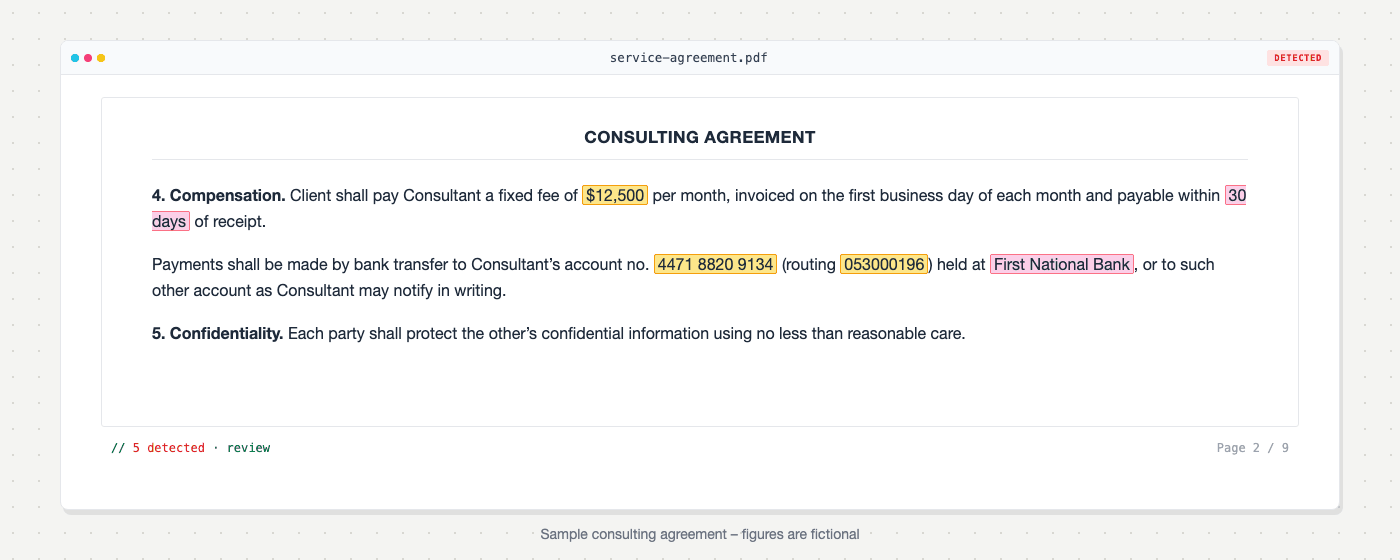
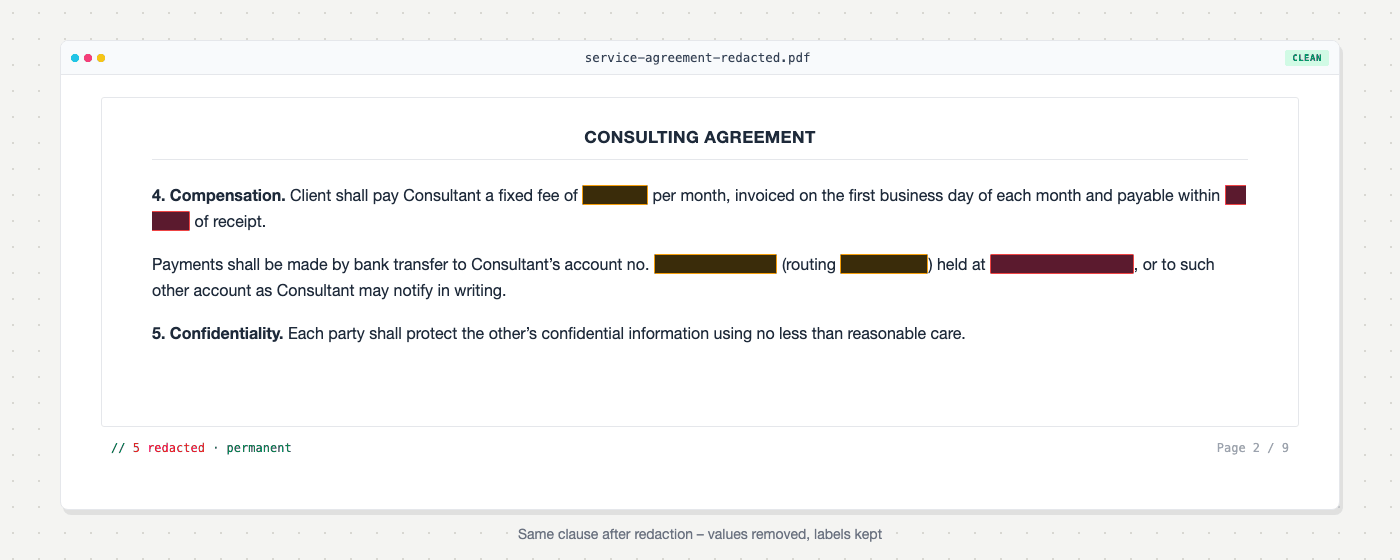
The labels stay and only the values go. A reader can still see that the clause sets a fee and names an account, which is usually all they need.
When You Need a Redacted Contract
| Situation | What usually gets hidden | Rule or standard |
|---|---|---|
| Public company filings (US) | Non-material terms the company keeps confidential, plus personal details | Regulation S-K, Item 601(b)(10)(iv) and 601(a)(6) |
| Federal court filings (US) | Social Security and taxpayer numbers, birth dates, minors' names, account numbers | Federal Rule of Civil Procedure 5.2(a) |
| Public records requests (US) | Trade secrets and confidential commercial details or info about $ | FOIA Exemption 4 |
| Sharing contracts that hold personal data (EU) | Personal data the recipient doesn't need | GDPR Article 5(1)(c), data minimisation |
| Due diligence, audits, sales samples | Pricing, third-party names, personal data | Your NDA and internal policy |
SEC filings
Speaking of the public companies, we must say that they file material contracts as exhibits. Item 601(b)(10)(iv) lets them redact specific provisions when the information is not material and is the kind the company "customarily and actually treats" as private or confidential. The filing has to show its work. Here's what, to be more precise:
- the exhibit index is marked,
- the first page carries a prominent statement that information was excluded,
- brackets show where each omission sits.
SEC staff can ask for the unredacted copy. A separate paragraph, Item 601(a)(6), covers personal details such as bank account numbers, Social Security numbers, and home addresses.
Court filings
When a contract is attached to a federal filing, Rule 5.2(a) limits may appear. Speaking of them, here's what we mean: the last four digits of a Social Security or taxpayer number, the year of birth, a minor's initials, and the last four digits of a financial account number. You can get to know more about the wider process in redacting legal documents.
Public records
It's under FOIA that contracts with government agencies can be requested. Exemption 4 protects "trade secrets and commercial or financial information obtained from a person" that is privileged or confidential. Since the Supreme Court's 2019 decision in Food Marketing Institute v. Argus Leader Media, we can call some info confidential if at least its owner customarily and actually treats it as private. Plus, s/he also has to give it to the government under an assurance of privacy, according to Department of Justice guidance.
What to Redact in a Contract
To cut the long story, you have to redact all the stuff that exposes pricing, bank details, personal data, or trade secrets. Take a look at more details below:
- Commercial terms: prices, rates, discounts, rebates, volume commitments, payment schedules.
- Financial identifiers: bank account numbers, IBAN and SWIFT details, tax IDs.
- Personal data: home addresses, personal phone numbers and emails, dates of birth, ID numbers, and salary in employment contracts.
- Signatures and initials: a handwritten signature is easy to lift from a shared file.
- Trade secrets: technical specifications, formulas, and anything detailed in schedules or annexes.
- Third-party names: customers, suppliers, and subcontractors listed in the body or the schedules.
- Hidden content: metadata, comments, and tracked changes.
What you can keep visible
Well, you have to keep visible stuff like the following:
- the contract title and date,
- clause numbering and headings,
- the term,
- the governing law,
- and the clauses the recipient asked to see.
Keep the parties' names too, unless someone asks for anonymity.
But don't forget that if you over-redact, you may cause a bag of other problems. A contract with every other line blacked out tells the reader…well, actually, it tells them nothing and invites pushback. Where a rule applies, it usually limits you as well: the SEC standard only covers information that is not material.
How to Redact a Contract Step by Step
To redact a contract, work on a copy, mark every sensitive item, remove the text permanently with a redaction tool, clear the hidden data, and verify the result before you share it.
- Work on a copy. Store the signed original separately and never redact it.
- Pin down the purpose. Who will read this copy, and which standard from the table applies?
- Mark every sensitive item. Go page by page, including schedules, annexes, headers, footers, and signature blocks. In long contracts the same figure often repeats across several clauses.
- Let permanent redaction do its job. Use a dedicated tool that removes the underlying text. Signed contracts are often scans, so they need OCR first; see redacting a scanned PDF.
- Clear hidden data. Remove metadata from your PDF, along with comments and tracked changes.
- Verify. Search for a redacted term, try to copy text from under the redaction marks, and check the document properties.
- Let readers know the piece was redacted. Mark it as redacted so nobody mistakes it for the full agreement.
PDFized takes the manual work out of steps 3 to 5. Upload the contract in your browser, and our free legal redaction software detects sensitive fields and permanently removes them, including on scanned files after OCR. Your original is preserved separately from the redacted version, and it's free to use. Whatever tool you choose, review the commercial terms yourself. Only you know which prices and clauses are sensitive in this particular deal.
For a general walkthrough of the methods, read how to redact a PDF.
Mistakes That Expose Redacted Contracts
All in all, there are top errors that most failed redactions come down to. We have them for you here:
- Black boxes over live text. In January 2019, lawyers for Paul Manafort filed a court document whose blacked-out passages could be read by copying and pasting them into a plain text file, as the ABA's Judges' Journal recounts. The same column describes a December 2011 federal court opinion in Apple's patent suit against Samsung that failed the same way, exposing text about Apple's licensing deals with Nokia and IBM.
- Forgetting the schedules. The body is clean, but the pricing annex at the back still shows every rate.
- Inconsistent redaction. A customer name is removed in clause 2 and left in clause 14, or in the file name.
- Leaving metadata behind. Author names, comments, and tracked changes can reveal what the black bars hide.
We go deeper on the consequences of failed redaction in a separate guide.
// faq
FAQ
A redacted contract is about a copy of a contract where some bits of information were permanently removed so the rest can be shared. The original is not changed.
No. The terms are used interchangeably, and the redaction process is the same.
Redaction doesn't amend the agreement. The signed original still governs, and the redacted copy is only a limited view for sharing. If a dispute is involved, check with your lawyer before sending anything.
If the "redaction" is a black shape or highlight placed over the text, often yes. If the text was removed with a proper redaction tool and the file was verified, no.
It's crucial to check the confidentiality clause first. Some contracts restrict sharing all existing versions without consent. And it doesn't matter if they're redacted or not.
Yes, within limits. Item 601(b)(10)(iv) allows it for information that is not material and that the company treats as confidential, and the redactions must be marked.